
Header photo by Brittany Colette on Unsplash
What was the issue?
While I would love to take all of the credit for this, my old squad working with this customer had to deal with this issue for a very long time, till we got our head together and figured out what was going on! Jake Morgan put most of this together into a more visual and documented sense for the customer so I am hoping to use what I remember from back then to put this together.
The issue we had, a customer using CNAMEs to point generic host names to key services within their network, were having major issues resolving the names once they had migrated to AWS. For this I will have to explain the scenario in a little more detail, the domain used in this example is one of my own - and something you should be able to test yourself with your own account if you so wish!
Ultimately during a migration, we needed to move a service from On-Premise to AWS, in doing so - it’s IP would change, but we only had one top level record for running this service. Switching the IP was, a little harder than expected, so here we go into a bit more detail as to what the domain was and what it entailed.
The domain
For this example, we are going to be using the acmeltd.co.uk domain. One of my personal domains that I use for random testing and development, bought when I had to use a domain for Active Directory, but over the years has become a little underused! For this to work correctly, the authoritative domain records can be found at:
ns1.faereal.netns2.faereal.net
Here the root domain sits, and where most of the “original” configuration will come from. Here we will have a top level entry of service1.acmeltd.co.uk to represent a service hosted somewhere in our environment.
The delegation
What our customer originally had setup, was not quite best practice, but this is why we had come into migrate them into AWS! However, this can show how the issue can occur.
Here we have to “pretend” that we have a DNS server on premise, in this example we will be using ns3.internal.faereal.net - this entry doesn’t exist, so it will always fail, but for our customer - this was pointing to a DNS server on-premise with a local non-internet routable IP.
The delegation we will use will be region.prod.acmeltd.co.uk - a regional production zone that will be initially hosted on-premise.
The service
Here is where we can go back to our service above. Internally, the service can be referenced by the DNS record service1.region.prod.acmeltd.co.uk of which we can pretend that this an A record that points to 192.168.100.10. This works fine on-premise when looking up. The next part of our example, the top level service will be a CNAME record, pointing to a record specifically hosted on our internal DNS server. service1.acmeltd.co.uk will be a CNAME record, pointing to service1.region.prod.acmeltd.co.uk. This means anyone looking up service1.acmeltd.co.uk will be pointed to the internal DNS server, where the record will be resolved to 192.168.100.5.
The migration
Usually, the easiest option here would be to use a Route53 Outbound Resolver however, in this instance - it doesn’t work as expected. So for the moment, we can say that this is in place, but we can ignore it for the moment.
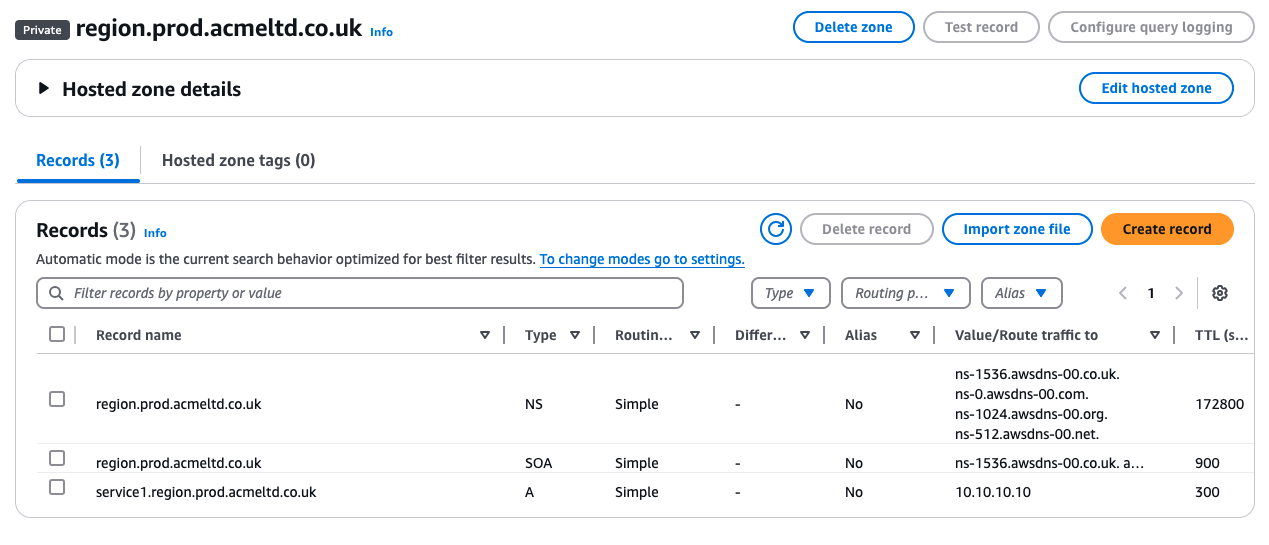
To try and get around the issue, we tried to setup a Route53 Private Hosted Zone to match the zone that is currently held on premise. region.prod.acmeltd.co.uk, in an attempt to localise the zone inside the VPC, in the hopes that this would resolve the query issues. Within this, we included a specific A record that points to a local IP inside AWS 10.10.10.10 as an example.
The expected DNS resolution pathway
So with all in place, we were expecting the following:
Within AWS
service1.acmeltd.co.uk -> CNAME -> service1.region.prod.acmeltd.co.uk -> Private Hosted Zone -> 10.10.10.10
Within On-Prem
service1.acmeltd.co.uk -> CNAME -> service1.region.prod.acmeltd.co.uk -> On-Premise DNS server -> 192.168.100.10
The outcome
|
|
Well, that didn’t work at all did it.
Troubleshooting the DNS resolvers
This is where we got stuck originally, DNS wouldn’t resolve, and we needed to get this working to ensure the migration worked. So we stepped through each resolver till we could see where the issue was.
From an EC2 instance
For our testing, we are going to be using a simple EC2 instance, this way we can check along the way. So lets look at where it resolves it’s DNS.
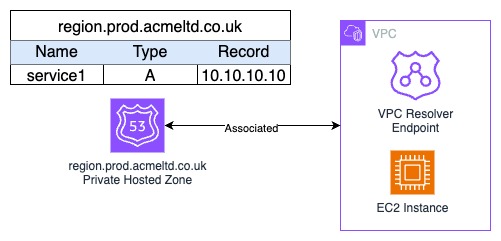
All VPC’s have their own DNS resolver build into it, specifically its on the second IP within each subnet, so if you had a subnet of 10.10.10.0/24 the DNS resolver would be at 10.10.10.2. For more information see the AWS documentation. Using the dig command we can see this in action, including the server it was looking at.
|
|
As you can see, the dig looking up the CNAME record did pull back the CNAME record, but it hasn’t then continued the resolution onto getting the A record from anywhere. Very confusing, as the VPC resolver also has the private hosted zone region.prod.acmeltd.co.uk associated to it, so logically it should have picked it up. What you see, is why this isn’t the case.
AWS’s External DNS resolver
From the VPC resolver, it is only logical that the lookup of service1.acmeltd.co.uk would then head out to the two authoritative public DNS servers. To be able to do this, AWS themselves will have a resolver to connect out to the public internet for you. This is why on a private subnet, with a VPC resolver enabled, it is possible to resolve public DNS records without any access to the internet.
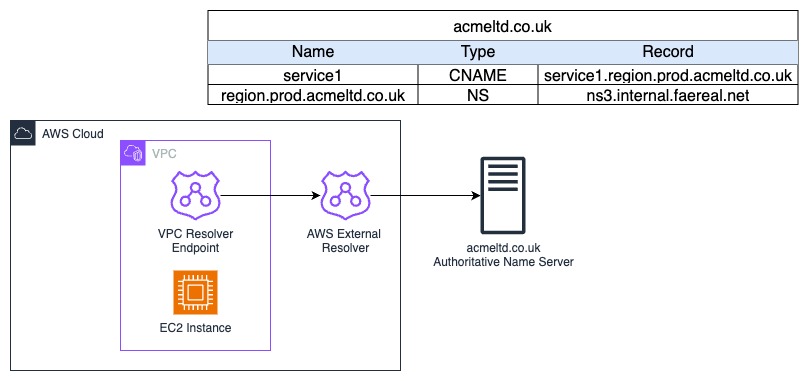
As the AWS External Resolver isn’t authoritative for the acmeltd.co.uk domain, it would pass the query onwards to its DNS servers, in this case, the ns1.faereal.net and ns2.faereal.net servers mentioned before.
The Authoritative DNS Resolver
Now that the query has been received by the authoritative DNS resolver, it finally can get the CNAME record, and this is what we saw from the server - it responded with the CNAME of service1.region.prod.acmeltd.co.uk. Which is then sent back to the AWS External Resolver, which then tries to look up that domain, and we hit an issue.
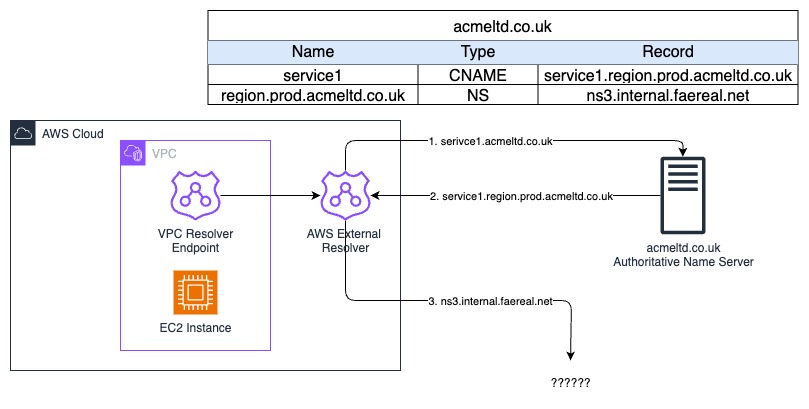
The AWS External Resolver already knows that the acmeltd.co.uk has the region.prod.acmeltd.co.uk record which is an NS record pointing to the private internal DNS server ns2.internal.faereal.net - this being an internal IP, means it can’t continue with the resolution, and will report back a SERVFAIL, and no record is resolved. The AWS External DNS resolver doesn’t have access to the VPC private networks, so it wouldn’t be able to resolve to the on-premise DNS servers. It’s the “knowing” part that causes the issue, as it won’t push the answer for the CNAME record back down the chain.
As one picture
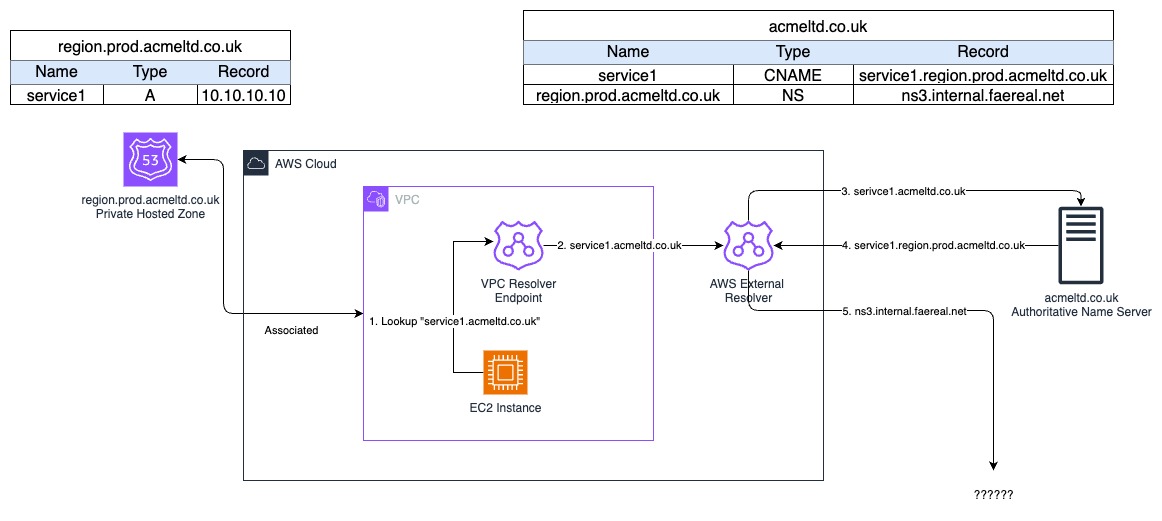
As you can see, even with the private zone, the and even a specific Route53 outbound resolver in your VPC, this setup doesn’t work. How did we resolve this.
The resolution
Of everything we tried, the only one that worked for this customer, was using a completely separate domain. Let’s see how this changes the setup.
The new domain
For our example, we will be using a new domain brkr.io, but also creating a new root level record called service2.acmeltd.co.uk that we will CNAME - this is just so if you wanted to follow along and see this for yourself, the lookups will work for you!
With this new domain, we can get the original CNAME record answer to be pushed back into the AWS VPC Resolver instead, and it can then do the final step of the look up for us. So quickly, this is how we set this up:
- A new root level
CNAMErecord has been setupservice2.acmeltd.co.uk- In the real world, we changed the originalservice1.acmeltd.co.ukto point to the new domain record - The
CNAMEpointed toservice2.region.prod.brkr.io - On-premise a new DNS zone was setup for
region.prod.brkr.ioto resolve services to local IP’s (192.168.100.10) within their on-premise setup - A new Route53 Private Hosted Zone called
region.prod.brkr.iowas created with a record forservice2.region.prod.brkr.ioto point to10.10.10.10
The output
|
|
It worked!
Why did it work?
For this, we will need to update our original diagram to show the flow, but the main reason is - the brkr.io domain in our example, wasn’t authoritative to the original DNS servers, so it needed to go back to “the start” and continue the resolution chain again. This allowed it to use the Route53 Private Hosted Zone for its lookup, but this would also work with a Route53 Outbound Resolver as well.
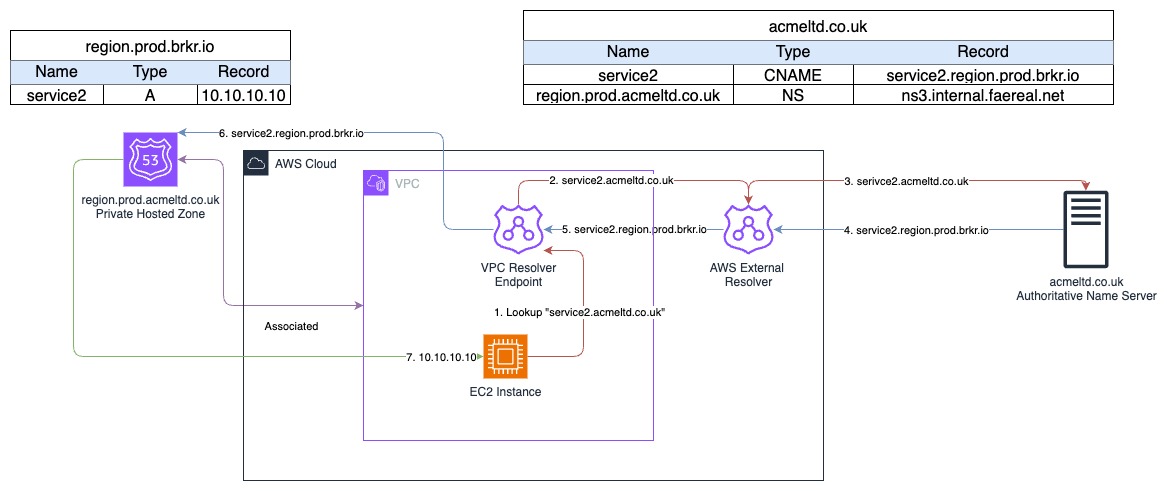
Summary
DNS can be very easy, it can also be a compete nightmare to work out where everything is! For us, it was this mysterious “AWS External Resolver” which, once we had put it on paper, made complete sense as to why it was the issue - however not knowing it was there was part of the problem. Always check your DNS resolution chains to see where and more specifically how a resolver is getting an answer.