⚠️ I am posting this as I was very close to completing this prior to changing roles. The post here was initially started in February. As such I had only two parts to complete at the end. Rather than lose where I was, I thought it best to post this, so that people could see where I am at. I would hope that this will be completed in the near future. ⚠️
Continuing on from Part 1, this guide will hopefully show how a product created by Check Point, can be used as a network security appliance, running on EC2 instances, within an auto-scaling group, behind a Gateway Load Balancer, to create a highly available, scalable, networking security appliance that almost acts like an on-premise deployment.
NOTE: There are multiple network appliances out there that work with the AWS Gateway Load Balancers, and a Firewall is just one of the many different uses of this service. As I have recently worked with a customer deploying this using the CloudGuard Network Security for the Gateway Load Balancer appliance, it made sense for me to write up how this was possible using this appliance directly!
How does the Check Point CloudGuard work?
With any deployment in the cloud that needs to emulate or be operated in the same way as any on-premise deployment, there does need to be a little description as to why this needs to exist in the first place. I have always been very keen to push the message that you need to be Cloud Native while on Cloud Platforms however, there is always a requirement which can’t be met in this way. Lucky for organisations, if you know what AWS can offer, this can easily be used to an organisations benefit, and enable a smooth pathway to evolving into a Cloud Native organisation. You just need to take that first step!
Let’s look at Check Point’s primary offering. These are dedicated or virtual appliances that can be installed in offices, data centres, or even larger home deployments. They are powerful systems that offer a wide range of security and connectivity services built into the deployments. Check Point make the global remote management of these appliances a lot more simple for organisations by using a Security Management solution, that centralises the configuration, provisioning, and monitoring of these appliances.
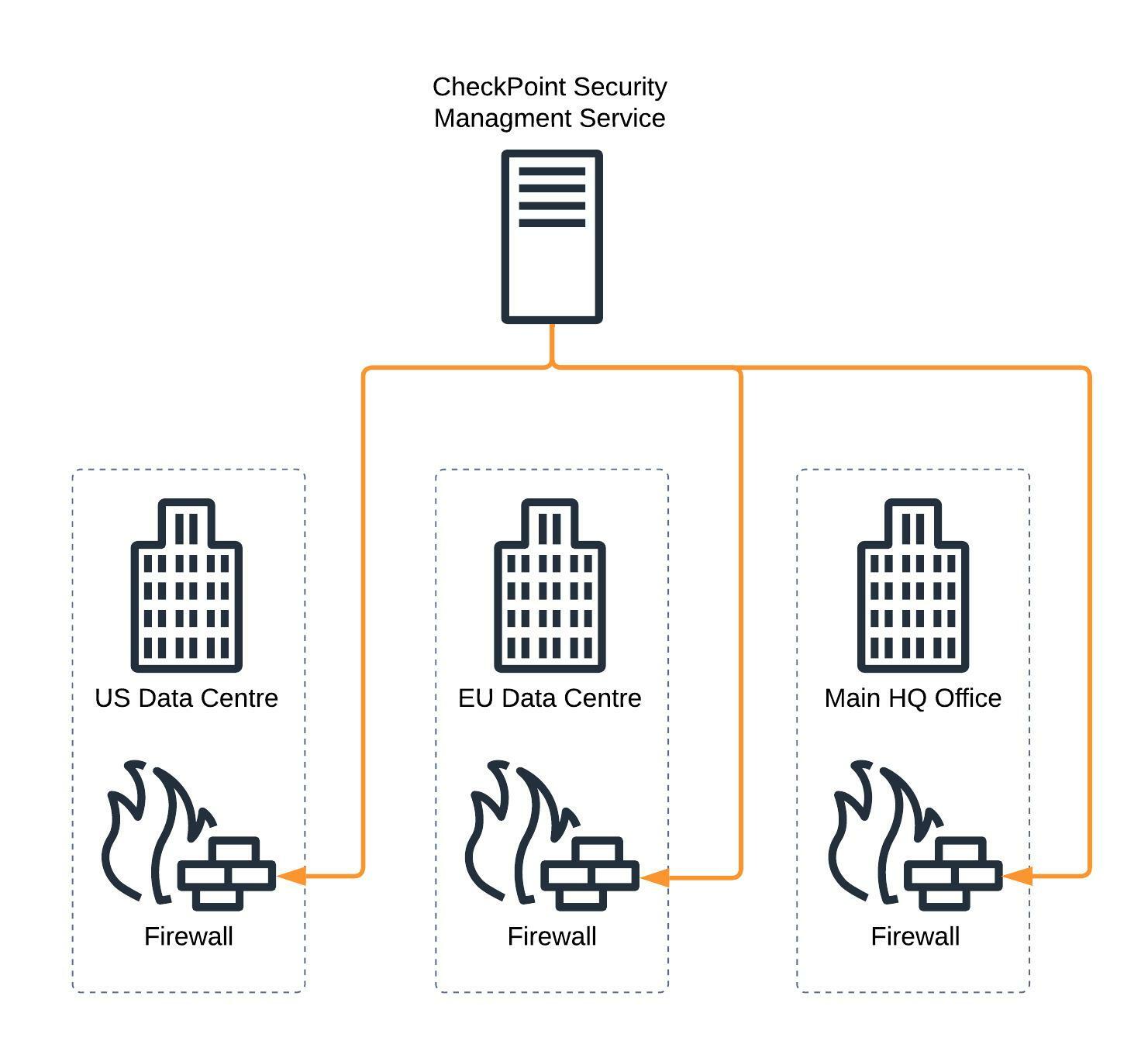
For larger organisations, security or networking teams having access to this unified console for all network and security management is vital for the continued operation of their company. Moving to a new product very quickly can cause issues with compliance against regulatory requirements that might not be as simple to change overnight.
Additionally, with the Shared Responsibility Model might require that the organisation takes on additional responsibility for the network, that a cloud provider might not be able to provide. Typically for compliance or regulatory reasons.
Wouldn’t it be great if you could run the appliance as an EC2 instance on AWS, and manage it in the usual way?
CloudGuard on AWS (the old way!)
Well, it would be simple to just say “yes” here, but it never ends up being as simple as that however, you will be surprised how quickly this can be resolved, when you know what the AWS services can offer, and how they can be used to an organisations advantage.
So in the first instance, it is pretty simple to set up an Amazon EC2 instance using the AWS Marketplace AMI for one of the Check Point Appliances, right?
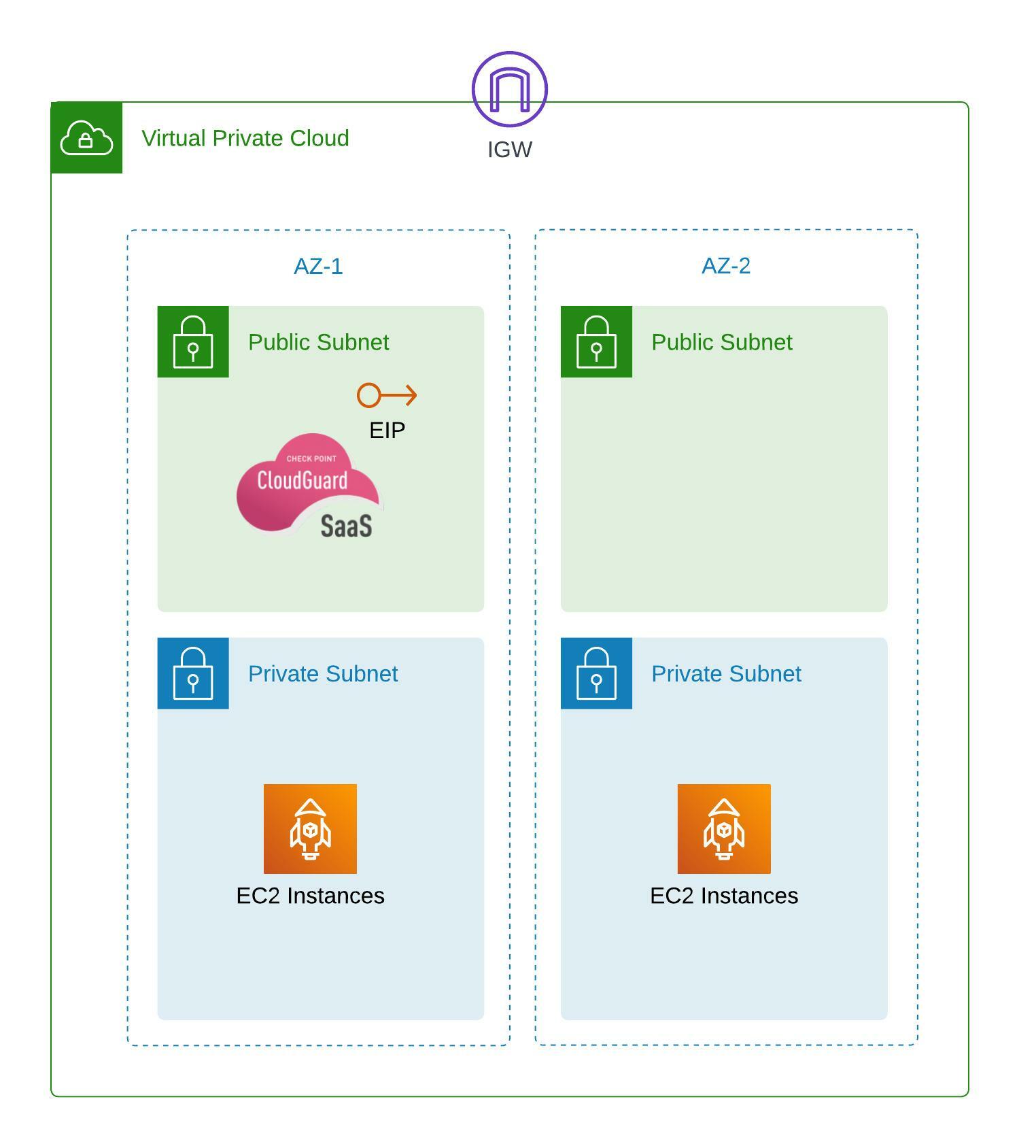
Big issue here, it’s a single appliance, sitting in a single Availability Zone. This would not follow any AWS Well-Architected best practices, and could leave an organisation at risk, if something were to happen to that instance. For example, if that instance crashed, then connectivity to the services behind the appliance would all become unavailable. Add to that, that the Elastic IP would be attached to the single instance, having written a lot of custom scripts to enable this IP to jump to a new instance, all this work will take time to complete. Time is something larger organisations can not afford, or also would be a breach potentially a number of regulatory or compliance requirements.
CloudGuard on AWS (the right way!)
As you probably know, Amazon EC2 AutoScaling is always the best practice for application deployments on EC2. Have your application be ephemeral, spin up and automatically be ready to serve the application to the expected clients, scale with demand, and always be available in the event one of the EC2 instances stops working. So why should that be any different for a network appliance?
The biggest issue that existed with older cloud deployments, is that the network was very much set in stone, it was controlled by the cloud provider, and you gave up the responsibility of this network to them. Putting an appliance in the cloud meant some level of sacrifice was needed, to ensure that the appliance worked. Basic deployment of the VPC, wouldn’t give you the options to be able to share clustered based IP’s, or having a simple solution to splitting the traffic.
This is where the AWS Gateway Load Balancer comes into play.

From here we are starting to see a deployment that is slightly more recognisable. NAT Gateways sit at the outer edge, that allow traffic out, the Check Point Appliances are sitting in a Private Subnet, and the Gateway Load Balancer is connected to the Auto-Scaling Group balancing the traffic between the appliances.
Putting all the elements of Check Point together
Now that we have a design for the autoscaling CloudGuard appliances, we need to deploy the rest. To do this we do need to jump back a little bit, and ensure we have set up the right elements for the Check Point Security Management service.
Firstly, the Check Point Security Management service. I’ll go into this into much more depth in a future blog post, but for the moment, we just need to ensure that the service has access to talk to the subnets that you will have the autoscaling CloudGuard instances.
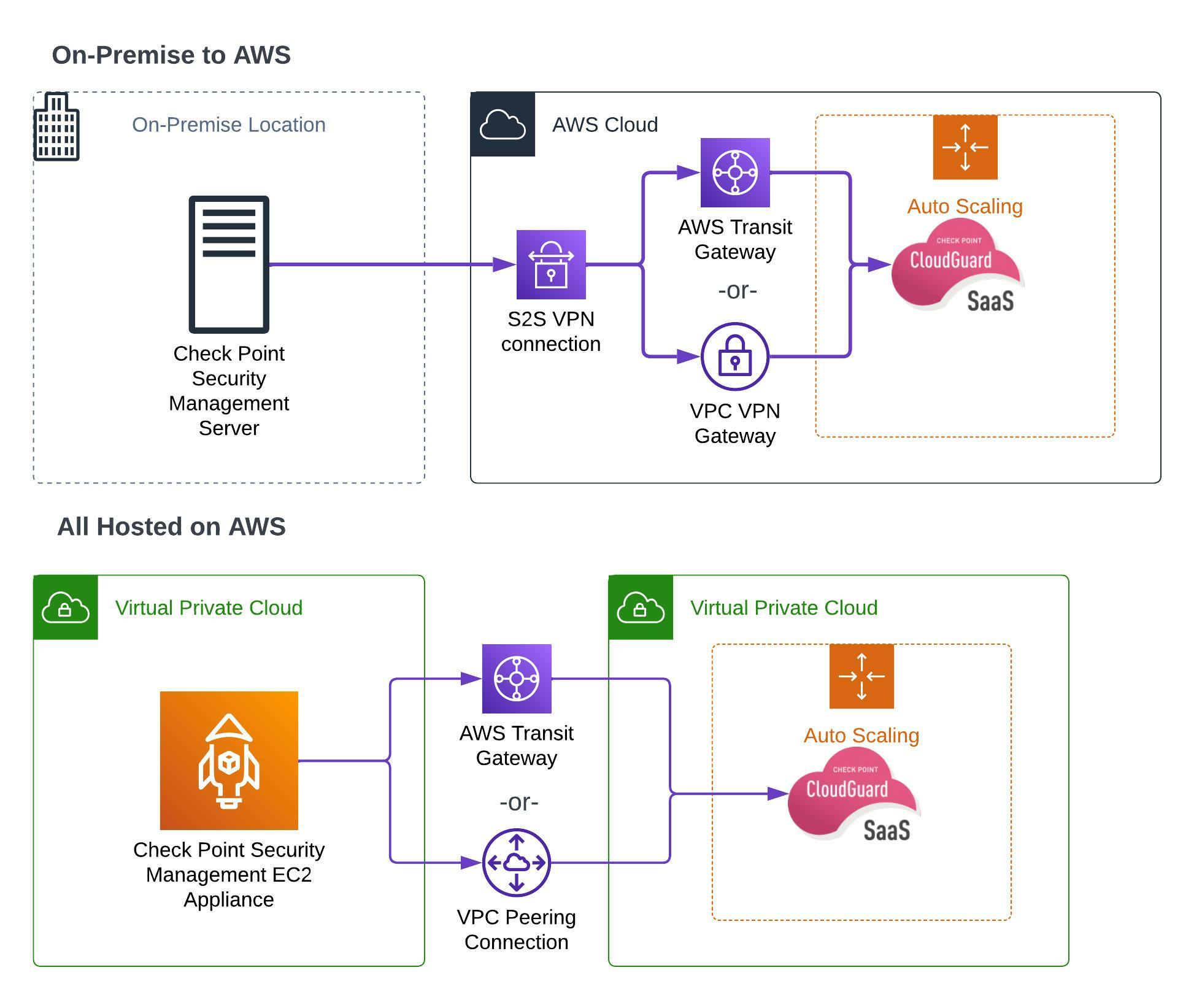
As you can see, the Security Management Service will run on a single instance, but it is also possible to run the service in a High Availability mode. For this example, lets just consider the diagrams of the Security Management Service as one of these highly available modes.
Simple connectivity is needed to the CloudGuard instances, much like you would need connectivity to the physical or virtual appliances on site. A site-to-site VPN or AWS Direct Connect will always be a preferred way to connect to them, especially as the final set up will involve putting the CloudGuard instances into a private subnet.
⚠️ This was where I reached before changing roles, at some point I will re-visit this as I will have to get up to date code to continue. Apologies for the delay in getting this article out! ⚠️