
Header photo by Alicja Ziajowska on Unsplash
Cloud security fears
According to a study by cloud security specialist Barracuda, many IT security professionals are reluctant to host highly sensitive data in the cloud. This is especially true when it comes to customer information (53%) and internal financial data (55%). Respondents also said their cloud security efforts are hampered by a cybersecurity skill shortage (47%) and lack of visibility (42%). More than half (56%) are not confident that their cloud set-up is compliant.
It’s likely that these concerns are felt even more acutely in financial services organisations. Yet the opportunities and benefits of cloud adoption are too great to be ignored.
To help address this dichotomy, AWS published a Financial Services Industry Lens for its Well-Architected Framework. The document shows how to go beyond general best practice to satisfy stringent financial services industry demands. It focuses on “how to design, deploy, and architect financial services industry workloads that promote the resiliency, security, and operational performance in line with risk and control objectives…including those to meet the regulatory and compliance requirements of supervisory authorities.”
It’s critical that financial services workloads hosted on AWS are aligned with the document’s design principles.
Well-Architected financial services
IT security risks come from within the organisation as well as outside it. Employee error or negligence can pose a significant threat, not to mention the damage that can be inflicted by malicious insiders. Whether data is stored in the cloud or on-premise, technical solutions must go hand-in-hand with operational measures.
For financial services organisations, least-privileged access or a ‘zero trust’ philosophy is a good starting point. AWS also advocates four principles to underpin the design of cloud-based architectures for financial services workloads:
- Documented operational planning
- Automated infrastructure and application deployment
- Security by design
- Automated governance
Automating infrastructure, application deployment and governance is perhaps daunting for organisations that are new to the cloud. However, it enables security to advance to a higher level than can ever be achieved on-premise. By minimising human involvement, it significantly reduces risk of error and improves consistency. It also allows quicker execution and scaling of security, compliance and governance activities.
Financial services organisations undergoing largescale migration would be well advised to refactor workloads for the new environment. This provides a valuable opportunity to introduce automation alongside security by design approaches. The additional upfront investment will go a long way towards addressing security concerns in the cloud.
As well as outlining general principles for the good design of financial services workloads, AWS illustrates six common scenarios that influence design and architecture. These include financial data, regulatory reporting, AI and machine learning, grid computing, open banking and user engagement. The list is not meant to be exhaustive, but an additional scenario that we regularly encounter is that related to network connectivity.
Read on to find out how we handled a financial data scenario for a customer that specialises in employee pay processes.
Financial data in cloud-based workloads
According to AWS guidance, any financial data architecture should exhibit three common characteristics:
- Strict requirements around user entitlements and data redistribution.
- Low latency requirements that change depending on how the market data is used (for example, trade decision vs. post trade analytics) and which can vary from seconds to sub-millisecond.
- Reliable network connectivity for market data providers and exchanges
But how are these upheld during mandatory audits, especially when it comes to user entitlement and data redistribution? This was the challenge facing one of our customers as it prepared for largescale cloud migration. An internal firewall appliance solution needed to meet the auditing requirements of regulatory bodies without compromising security standards.
Our solution involved the CloudGuard platform from cybersecurity specialist Check Point, enabling traffic to be scanned securely in a way that met regulatory stipulations. We also suggested modernising the security set-up to make the important transition from a ‘pet’ to a ‘cattle’ mindset. This paved the way for a more automated approach firmly aligned with security by design principles as well as allowing the customer to build out scalable groups behind the scenes. Our approach is rooted in the assumption that failure is inevitable, looking to minimise the damage that occurs when it happens. In this way, it supports both the ‘reliability’ and ‘security’ pillars of Well-Architected.
A high level overview
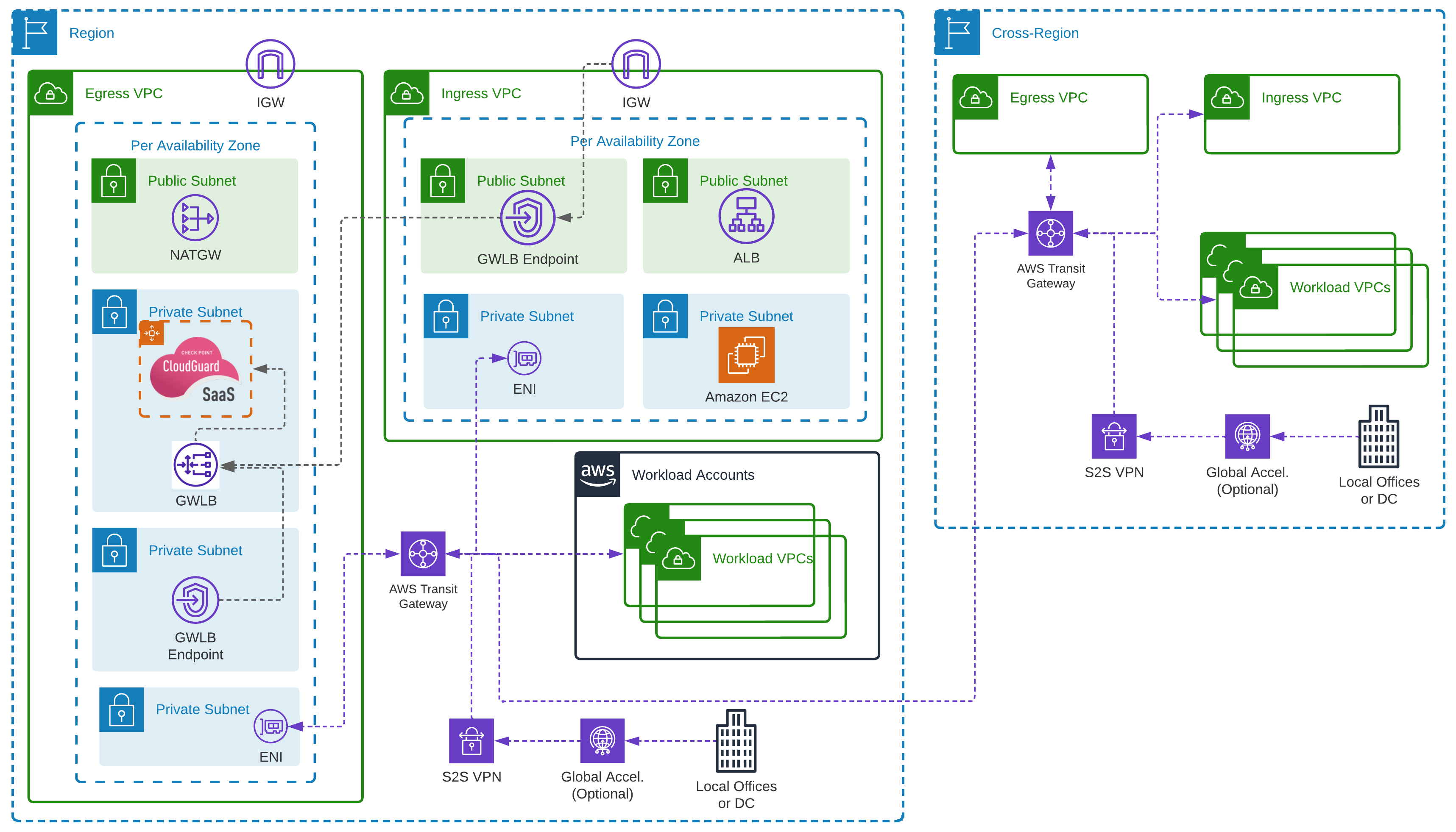
As the below diagram shows, we used AWS Gateway Load Balancers (GWLB) on the third layer of the networking Open Systems Interconnection (OSI) model, dynamically routing traffic to firewall appliances. As with any Application Load Balancer (Layer 7) or the Network Load Balancer (Layer 4), GWLB can step down to the network layer, using the GENEVE protocol, removing the need for ‘static’ or ‘pet’ instances to run the firewall appliance. financial services networking set up
GWLB understands and can control the physical path that data takes without affecting the Transport Layer (4) which primarily deals with transmission protocols. This enables the use of autoscaling to dynamically scale firewall appliances in response to changes in traffic requirements. It’s similar to how an Application Load Balancer understands and translates application traffic, forwarding it to the correct endpoint. And it’s cheaper than running the appliances all the time.
As with all AWS’ Elastic Load Balancers, you can configure AWS Private Link to set up endpoint services and endpoints within subnets. We’ll come back to this later.
The above design also deploys the AWS Transit Gateway (TGW) service. This ‘level up’ on the original virtual private cloud (VPC) peering option allows you to configure deeper routing of traffic between VPCs. It’s highly available, secure, and ensures traffic never needs to leave the security of your AWS network. Exposure from the public internet is reduced as there are no internet-facing endpoints. And it’s also possible to include completed routing that pushes traffic to a centralised VPC, in this case ‘Egress’. Traffic bound for the internet is routed through the TGW service, and then through the Check Point appliance. This in turn uses NAT Gateways to talk to the internet.
Industry-specific requirements
Using these services together, you can configure Internet Gateways assigned to VPCs to allow modification of routes for external traffic. It’s also possible to associate a standard VPC route table to the edge using an ‘edge association’. By pointing the routes for any external IP to the previously created TGW VPC endpoints, this traffic can be:
- encapsulated and sent through the Check Point appliances,
- filtered, scanned, checked, and firewalled,
- returned to the service that exists in the Public Subnet,
- sent to the final destination.
In our diagram, the Application Load Balancer in the Public Subnet balances traffic to EC2 instances in an autoscaling group.
The final service is the AWS Resource Access Manager (RAM), which is part of AWS Organizations. Centralised network administration is a key compliance requirement for several financial services certifications or programmes. However, configuring a VPC for access from the internet requires an Internet Gateway, which poses a security risk. Deploying the VPC and Internet Gateway into a central network account provides full control and visibility for relevant people. However, building resources in this VPC would normally require additional work to give appropriate levels of access. AWS RAM solves this by sharing resources with other accounts.
In the above example, two of the four subnets required for the set-up to work have been shared. So, the account with the shared subnets will be able to build resources and have full control of the process. However, it will not be able to bypass routing options set in place by the networking team, specifically the Gateway Load Balancer endpoint. This reduces risk and assures security/networking teams and auditors that nobody working in the accounts can bypass Check Point appliances.
Enhanced security outcomes
The above solution ensures all traffic, specifically confidential information, is internally routed and doesn’t leave the secure network. Any traffic ingress and egress passes through the Check Point appliances, securing the data within the AWS network.
Network engineers, security teams and compliance auditors are given a centralised view and greater visibility of the deployed AWS network. The set-up permits any specific custom data monitoring elements using the Check Point appliances. With additional custom routing on TGW, you can also force traffic between VPCs to pass through the Check Point appliances. This adds a further level of network segregation, which can reduce the risk of data exfiltration between accounts and environments.
An additional benefit is that the Check Point appliance service works like any on-premises version. This reduces the need to re-skill teams to use a different technology stack and facilitates integration with existing management services. It also means the same solution can work with other networking appliances that support the GENEVE protocol, extending the range of services that align with the organisation’s existing skillsets.
Putting the solution to the test
The solution design itself was deployed to a financial services customer that had specific requirements around both ISO27001 compliance, and their own internal security teams. As with all customers you work with, there will always be requirements which do not fit a “standard” pattern of deployment, or services required. While there are many AWS services that could be used that are managed by AWS through the shared responsibility model, there are times when these might not meet a specific set of requirements. For our customer at Expert Thinking, we had to ensure that pre-existing administration of the Check Point appliances hosted in-house was not separated from the management of network security within AWS. Using the AWS Gateway Load Balancer to our advantage, we were able to use the Check Point Cloud Guard appliances instead.
By using this solution, we were still able to meet the checks within the AWS Well-Architected Framework for section 5 of the Security Pillar. Specifically the sections on Controlling traffic at all layers and Automating network protection. This was achieved through the use of the centralised Check Point Management system across the customer’s networking estate, and it feeing in key information to the Check Point Appliances within AWS, so that the pre-existing automations for network security were achieved, including across all of the layers.
One of the great ideals behind the Well-Architected Framework, is that it is not a check-list to use specific AWS services, but a checklist of concepts that if you follow, will ensure you are Well-Architected. Automating network protection could be using AWS WAF, or AWS CloudFront, as well as also using a managed firewall, or a firewall that you have installed on an EC2 instance that you run automation scripts on. Look at the risk behind each option, and if you have removed the risk, or accepted the risk with mitigations in place, then you will continue to be Well-Architected.
Expert Thinking’s Well-Architected Assessment
We at Expert Thinking used our own AWS Well-Architected Assessment throughout the process of delivering for this customer. The review is not just a single check that you leave to the side, but a continual check throughout the whole delivery process. Expert Thinking ran the AWS Well-Architected Review at the discovery phase of our journey, understanding the current security requirements and potential high risk elements that we would need to remediate. Working with the customer during the design and implementation phases, we continually checked in with the Well-Architected Framework to ensure that the work we had been delivering still met with the standards set within each of the pillars.
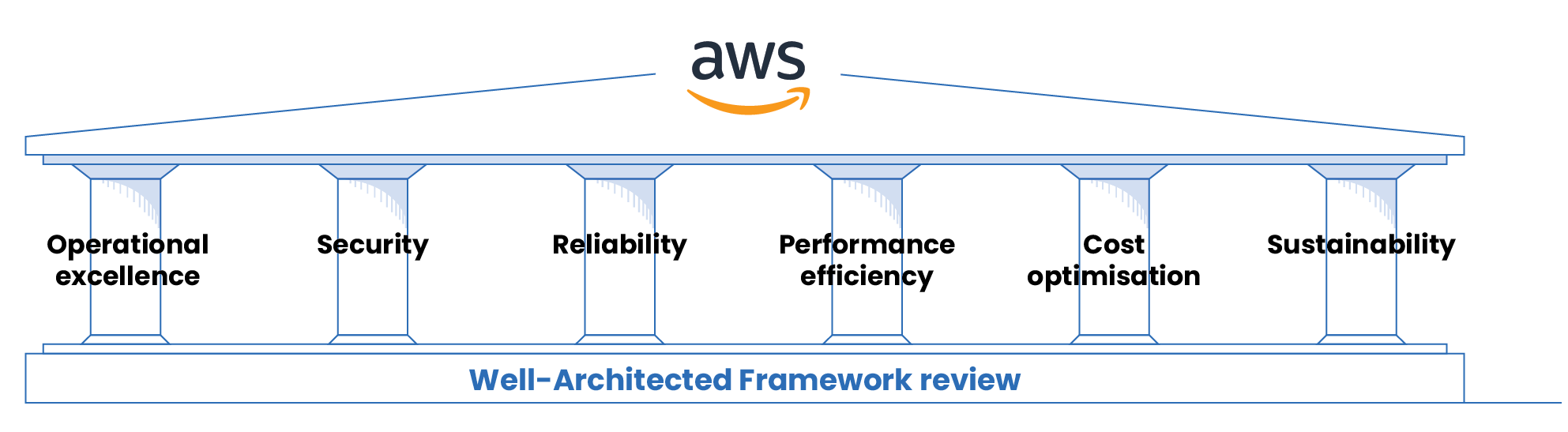
Once we had completed the delivery for the customer, a final review was performed by Expert Thinking’s consultants to once again show that we had delivered the security requirements set by both the customer and the Well-Architected Framework. In doing so, we continued to boost the best practices for our financial services customer.
If you wish to discuss with Expert Thinking running an AWS Well-Architected Assessment on your estate, then please reach out to our wonderful team who will be able to set you along the path of continued best practices.